Create a high-performance triple-display workstation by connecting a USB Type-C™ device to three independent HDMI® monitorsThis 3-port USB-C to HDMI MST hub lets you connect three HDMI monitors to your USB Type-C Windows device, conveniently helping you to increase and maximize your productivity.Multi-tasking Made EasyWith devices becoming more portable than ever, you can be limited to fewer video outputs and confined to your small integrated screen. This multi-stream transport hub solves that problem by enabling you to connect three displays to your USB-C computer, making multi-tasking much easier.Using this USB-C to HDMI video splitter, you can mirror your display onto additional monitors or stream independent content to each display which makes it the ideal accessory for travel or hot-desking.Astonishing Picture QualityMST technology uses your existing video card to minimize the use of system resources while delivering UHD 4K resolutions for up to two monitors simultaneously. Plus, because the USB-C hub can output HD 1080p on three independent displays, it’s perfect for all high-resolution applications such as graphic design and medical imaging.Hassle-Free SetupMulti-stream transport offers an easy setup, by natively working on any Windows device that supports DP Alt Mode over USB Type-C. This USB-C to HDMI adapter is Thunderbolt 3 compatible and offers for plug-and-play installation with no drivers or software required. Additionally, this triple monitor adapter is powered by the USB-C port, meaning no external power cords are necessary.MSTCDP123HD is backed by a StarTech.com 3-year warranty, and free lifetime technical support.The StarTech.com Advantage
The U444-010-DP USB 3.1 Gen 1 USB-C to DisplayPort 4K Adapter Cable (M/M) helps you transmit digital audio and 4K video from your tablet, laptop, Chromebook, MacBook, smartphone or PC to a DisplayPort-enabled monitor or projector. It’s an ideal tool for giving video presentations in conference rooms and classrooms, editing multiple documents on a larger screen, or streaming video for digital signage in crystal-clear 4K.With a source device that also supports USB DisplayPort Alternate Mode, you can extend 4K video from your primary display to another, duplicate the same video on both displays, or change the second display to your primary. By connecting to an existing DisplayPort display, you’ll save the clutter of adding more cables and adapters.The plug-and-play U444-010-DP requires no software, drivers or external power. Connect the reversible USB-C plug to your source device’s USB-C or Thunderbolt 3 port. The fumble-free USB-C plug connects in either direction to ensure fast, easy connection every time. Then, connect the DisplayPort plug to your display.This 10-ft. (3.05 m) cable supports UHD video resolutions up to 3840 x 2160 (4K) at 60 Hz, 36-bit Deep Color (12 bits per channel) and per-lane transfer rates of 5.4 Gbps (HBR2), 2.7 Gbps (HBR) and 1.62 Gbps (RBR). It also supports USB 3.1 Gen 1 data transfer rates up to 5 Gbps. Foil and braid shielding protects against EMI/RFI line noise that can distort or destroy data.
Connects a Mini DisplayPort Display to Your USB-C or Thunderbolt 3 DeviceCompatible with USB-C or Thunderbolt 3 source devices that support USB DisplayPort Alternate ModeIdeal for giving video presentations, editing multiple documents, or streaming 4K video for digital signageSupports USB 3.1 Gen 1 data transfer rates up to 5 GbpsSupports DisplayPort 1.2 specificationsExtend 4K video from your primary display to another, duplicate the same video on both, or convert a secondary display to be the primary displayCrystal-Clear 4K Video and Digital AudioSupports UHD video resolutions up to 3840 x 2160 (4K) @ 60 HzSupports 36-bit Deep Color (12 bits per channel)Supports per-lane transfer rates of 5.4 Gbps (HBR2), 2.7 Gbps (HBR) and 1.62 Gbps (RBR)Reversible USB-C ConnectorFumble-free reversible USB-C plug connects in either direction for quick connection every timePremium ConstructionGold-plated connectors and contacts for maximum conductivity and minimum data lossFoil and braid shielding protects against EMI/RFI line noise that can distort or destroy dataIntegral strain relief helps cable and connectors move freely without stress or crackingDurable PVC jacket designed to last a long timeReady for Instant UsePlug-and-play operation with no software, drivers or external power required6 ft. length easy to manage in crowded environmentsBackward compatible with non-4K displays
The D-Link DUB-H7 7-Port USB 2.0 Hub provides an easy way to add 7 additional USB ports to your PC or Mac, allowing you to connect more devices. With its Fast Charge Mode, each of the USB ports can provide sufficient power to connect and charge iPads and tablets. Add Seven USB 2.0 Ports to Your ComputerWith the DUB-H7 7-Port USB 2.0 Hub, you can conveniently add 7 additional USB 2.0 ports to a notebook or desktop computer, allowing you to connect 7 more USB devices, such as digital cameras, printers, external hard drives, keyboard/mouse, flash drives and tablets. USB 2.0 technology supports fast data transfer rates of up to 480 Mbps, which means that you can save/access files and sync your devices faster compared to previous USB standards.Fast Charge Your DevicesThe DUB-H7 features 7 Fast Charge USB ports that are designed to provide increased maximum charging current of up to 2.4 A. This makes it perfect for charging power-hungry devices like the iPad or tablets quickly, even with their high-capacity batteries. Compact and PortableThe DUB-H7 does not require to be connect to a computer to charge your devices. With it’s compact size, so you can take it with you on your travels to charge your smartphone, tablet and camera without the need to bring multiple chargers. Alternatively, you can use the DUB-H7 without the power adapter to easily add 7 additional USB port to any computer.Plug and PlaySimply connect the DUB-H7 to your notebook or desktop computer to add 7 additional USB ports. It’s that easy, no drivers or software installation required.
An easy-to-use, secure, and reliable solution makes it easier to connect a wide range of serial devices to an IP-based Ethernet LAN in an instant. The ATEN SN3402P Secure Device Server provides simple, fast serial-to-Ethernet connectivity, allowing your PC to remotely allowing users to remotely access serial RS-232/422/485 devices from a PC located anywhere. With various reliable features, the SN3402P is ideal for commercial and industrial process control applications.Surge and Isolation Protection Ensure System StabilitySurge protection is a vital aspect of any facility’s coordinated electrical protection to ensure safe and reliable operation. To this end, in addition to 1.5kV magnetic isolation protection for Ethernet signals, the SN3402P Secure Device Server features surge protection for serial, Ethernet, and power that protect against voltage spikes or uncontrolled increase in current. Furthermore, as well as industrial safety standards compliance, they are also tested to meet IEC 61000-4 surge wave form requirements to ensure system stability and reliability.Level-up Device Security at Every StageThe growing numbers of cyber attacks in the industrial IoT era has the potential to bring down systems and cause huge losses of time and money. In order to avoid potential vulnerability risks, enterprises need a multi-layered defense system to ensure secure data transmissions that include regular firmware upgrades, as well as various encrypted forms of authentication and access control. The SN3402P secure serial-to-Ethernet solution is equipped with security functions at every level, including network access control and user authentication, data integrity and confidentiality. Furthermore, with an operation mode available for advanced security functions, you can acquire any field data needed and provide frontline protection.Comprehensive Secure Operation ModesThe SN3402P offers a broad choice of operation modes to help different types of serial devices to be seen on the network including Real COM, TCP, Serial Tunneling, Console Management and UDP. With each operation mode the SN3402P is equipped with advanced secure functions to assist users in streamlining operations and ensuring serial data is securely transmitted.Seamless and Cost-Effective Modbus GatewayThe SN3402P can be used as standard Modbus gateway for conversion between Modbus TCP and Modbus RTU / ASCII protocols. It can integrate Modbus serial slave devices seamlessly into an existing Modbus TCP network, thereby making them accessible to serial master devices.Easy Setup with Web Console and Telnet/SSH ConsoleThe SN3402P offers a 3-step setup web console for fast installation. Its browser access is supported via intuitive multi-language features that facilitate a quick setup and control of the devices in just three configuration steps to activate the application. This makes setup simple and fast, and users can complete it in an average of only one minute. Moreover, for bandwidth-sensitive applications, a Telnet/SSH console is also available as a low-bandwidth solution.Easy to TroubleshootATEN understands the seriousness of data loss and breaches. The SN3402P features 64 KB port buffering to prevent data loss in case a network is down, and event notifications will be sent automatically by SMTP email and SNMP Trap if serial devices go offline due to power failure, or trigger a user - defined error. Moreover, system event logs are available to record and track operation history, and can be saved to internal memory or Syslog server, so you can retrieve data for monitoring and troubleshooting at any time.Target ApplicationsThe SN3402P enables instant networking of serial devices and can be deployed in a variety of commercial applications and industrial process automation environments that require serial-to-Ethernet connectivity. These include POS, access control, SCADA systems, environment monitoring, sensor monitoring, device management, remote site management, and more.Versatile Mounting OptionsThe SN3402P can be flexibly mounted in various installation environments, so you can easily configure it to your workplace. Mounting options include wall, desktop, DIN rail mounting, or rack mounting (with optional kit VE-RMK1U) as required.
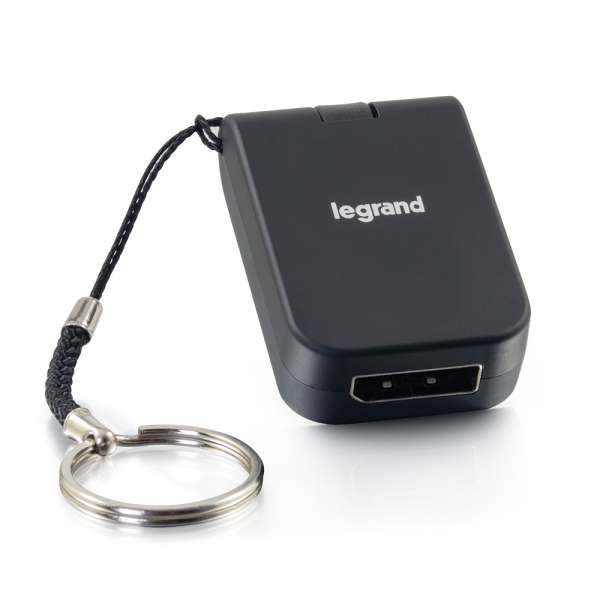
Connect a USB Type-C device to the DisplayPort input of a monitor, projector, or HDTV to display video and audio.The USB-C to DisplayPort Travel Adapter is the perfect solution for connecting a device with a USB 3.1 Type-C connector to an HDTV, projector, or other display with a DisplayPort input. With this adapter, you can rest easy knowing that you have the right connection you need while traveling or on the go.ConvenienceThe compact, mobile design of this adapter and the convenient smart ring keychain make it perfect for BYOD (Bring Your Own Device) applications in any environment. Simply keep this adapter on your keychain or even in your pocket to be prepared for your next big meeting.PerformanceThis adapter supports resolutions up to 4k (3840 x 2160 at 60Hz), allowing it to deliver a high-quality video image to the connected display.
An easy-to-use, secure, and reliable solution makes it easier to connect a wide range of serial devices to an IP-based Ethernet LAN in an instant. The ATEN SN3401 Secure Device Server provides simple, fast serial-to-Ethernet connectivity, allowing users to remotely access serial RS-232/422/485 devices from a PC located anywhere. With various reliable features, the SN3401 is ideal for commercial and industrial process control applications.Surge and Isolation Protection Ensure System StabilitySurge protection is a vital aspect of any facility’s coordinated electrical protection to ensure safe and reliable operation. To this end, in addition to 1.5kV magnetic isolation protection for Ethernet signals, the SN3401 Secure Device Server features surge protection for serial, Ethernet, and power that protect against voltage spikes or uncontrolled increase in current. Furthermore, as well as industrial safety standards compliance, they are also tested to meet IEC 61000-4 surge wave form requirements to ensure system stability and reliability.Level-up Device Security at Every StageThe growing numbers of cyber attacks in the industrial IoT era has the potential to bring down systems and cause huge losses of time and money. In order to avoid potential vulnerability risks, enterprises need a multi-layered defense system to ensure secure data transmissions that include regular firmware upgrades, as well as various encrypted forms of authentication and access control. The SN3401 secure serial-to-Ethernet solution is equipped with security functions at every level, including network access control and user authentication, data integrity and confidentiality. Furthermore, with an operation mode available for advanced security functions, you can acquire any field data needed and provide frontline protection.Comprehensive Secure Operation ModesThe SN3401 offers a broad choice of operation modes to help different types of serial devices to be seen on the network including Real COM, TCP, Serial Tunneling, Console Management and UDP. With each operation mode SN3401 is equipped with advanced secure functions to assist users in streamlining operations and ensuring serial data is securely transmitted.Seamless and Cost-Effective Modbus GatewayThe SN3401 can be used as standard Modbus gateway for conversion between Modbus TCP and Modbus RTU / ASCII protocols. It can integrate Modbus serial slave devices seamlessly into an existing Modbus TCP network, thereby making them accessible to serial master devices.Comprehensive Secure Operation ModesThe SN3401 offers a 3-step setup web console for fast installation. Its browser access is supported via intuitive multi-language features that facilitate a quick setup and control of the devices in just three configuration steps to activate the application. This makes setup simple and fast, and users can complete it in an average of only one minute. Moreover, for bandwidth-sensitive applications, a Telnet/SSH console is also available as a low-bandwidth solution.Easy to TroubleshootATEN understands the seriousness of data loss and breaches. The SN3401 features 64 KB port buffering to prevent data loss in case a network is down, and event notifications will be sent automatically by SMTP email and SNMP Trap if serial devices go offline due to power failure, or trigger a user defined error. Moreover, system event logs are available to record and track operation history, and can be saved to internal memory or Syslog server, so you can retrieve data for monitoring and troubleshooting at any time.Target ApplicationsThe SN3401 enables instant networking of serial devices and can be deployed in a variety of commercial applications and industrial process automation environments that require serial-to-Ethernet connectivity. These include POS, access control, SCADA systems, environment monitoring, sensor monitoring, device management, remote site management, and more.Versatile Mounting OptionsThe SN3401 can be flexibly mounted in various installation environments, so you can easily configure them to your workplace. Mounting options include wall, desktop, DIN rail mounting, or rack mounting (with optional kit VE-RMK1U) as required.
The USB-C to Dual HDMI MST Hub allows a USB-C enabled device to connect to two HDMI enabled displays for video mirroring, video extension, or viewing a single video image across two displays. The hub is perfect for graphic design, spreadsheet analysis, and digital signage applications. This MST hub is a perfect accessory for Microsoft® Surface® products and other leading laptops.Improve multitasking and increase productivity by configuring the hub to work as a splitter with the same video image on each display, extending a video image to multiple displays, or expanding a video image by joining multiple monitors together as one display. The hub is ideal for a multiple display desk setup and the lightweight, small form factor, also makes it easy to carry while traveling or just on the go.The hub supports resolutions up to 4K (3840 x 2160) at 60Hz when connected to a single or dual display and has a max bandwidth of 32.4Gbps.Notes:This MST hub uses DP Alt Mode. The source device video card and display must support DP Alt Mode and MST.Maximum resolutions are limited by the capabilities of the connected source’s graphic card.When connecting to Chromebooks and MacBooks, the desktop image can be extended to two monitors with a single video stream, meaning that you will see two identical images on the two extended monitors.
MFR: Netgear, Inc
Qty: 1
Part #: GS105NA