

ASUS ZenWiFi BD4 (2-pack EU+UK) Dual-band (2.4 GHz / 5 GHz) Wi-Fi 7 (802.11be) White Internal
ASUS ZenWiFi BT8 Worry-Free Smart Home MeshThe ASUS ZenWiFi series advances your ever-evolving smart home with worry-free WiFi. The ASUS ZenWiFi BT8 raises the bar for whole-home mesh with WiFi 7 and next-gen Smart AiMesh technology. It delivers blazing-fast tri-band speeds up to 14 Gbps and unleashes superior 6 GHz WiFi. Along with ultra-high-speed dual 2.5-gigabit Ethernet ports and a suite of advanced network and security technologies, this mesh WiFi system is ready for the future of your smart home network today.DESIGNThe Pinnacle of WiFiASUS ZenWiFi BT8 embodies our unwavering commitment to developing incredible in-house WiFi and network technologies. Seamlessly connect to your family and friends within a worry-free connected experience.Incredible Comes From WiFi 7IEEE 802.11beWiFi 7 Powering Premium MeshThe ZenWiFi BT8 boasts cutting-edge WiFi 7 technology. This superior tri-band mesh system unleashes the full potential of WiFi 7 with wired backhaul options. Enjoy a next-generation connected experience for home entertainment and cloud computing, including 8K streaming, HDR gaming, content creation and AI.Tri-band up to 14000 MbpsUp to 2.4x Faster* With 320 MHz & 4K-QAM *Compared to WiFi 6ETri-band Multi-Link With 2.4 GHz + 5 GHz + 6 GHzSuperior 6 GHz WiFiBoasting a superior 6 GHz band, ZenWiFi BT8 unleashes blazing-fast tri-band WiFi 7 speeds up to 14 Gbps. It ensures comprehensive WiFi compatibility for a wide range of devices, from cutting-edge WiFi 6E mobile devices to legacy IoT devices.Comprehensive MLO SupportMulti-Link Operation (MLO) enables buffering-free connection by intelligently combining and switching between the 2.4 GHz, 5 GHz, and 6 GHz bands. ZenWiFi BT8 is built to be future-proof with all WiFi 7 devices, regardless of the MLO mode they use.**Supported MLO modes and bands may vary by device. Please refer to device specifications for details.Ultrawide 320 MHz ChannelsWiFi 7 introduces ultrawide 320 MHz channel bandwidth in the 6 GHz band, doubling data transmission capacity. This allows for significantly more simultaneous transmissions at the fastest possible speeds.Efficient 4K-QAM TransmissionCompared to 1024-QAM with WiFi 6/6E, 4096-QAM allows each signal to more densely incorporate larger amounts of data, delivering up to 20%* more efficient data transmission.MESH TECHNOLOGYAI-Boosted Smart AiMeshZenWiFi BT8 harnesses the power of WiFi 7 and next-gen Smart AiMesh technology to deliver wider coverage, a more stable and secure network and a feature-rich network experience – all under one network name for your entire smart home.A 2pk coverage up to 5,900 sq. ft. 5+ RoomsA 1pk coverage up to 3,000 sq. ft. 4+ RoomsIntelligent Mesh BackhaulSmart AiMesh backhaul intelligently leverages WiFi 7 Multi-Link Operation, automatically aggregating or switching across multiple bands for optimized performance and low latency.A GIF showing ASUS Smart AiMesh auto-aggregating or switching across multiple bands for optimal backhaul.Scalable 2.5G ConnectivityExperience lightning-fast speeds even in homes with thick walls. With dual 2.5G ports, you can extend the 2.5G wired mesh backhaul between mesh nodes for strong, seamless connectivity, ensuring your entire home network stays connected and ready for the future.Smart MLO ConnectSmart AiMesh uses Multi-link Operation to achieve a faster connection. Intelligent algorithms direct low-priority packets to the less congested band, ensuring that high-priority packets remain lightning-fast for optimal data transmission.A GIF showing email packets directed to a less congested band, while high-priority packets enjoy fast MLO transmission.Values Beyond ExtensionAiMesh goes beyond just extending coverage or seamless roaming. It works with all compatible ASUS routers, offering easy management, advanced security and smart home features across your entire network.PerformanceEngineered for Always-Connected HomeASUS engineering shines in ZenWiFi BT8's robust design, delivering superior coverage and unrivaled reliability.Unrivaled Coverage and ReliabilityWith seven internal antennas and eight high-power front-end modules, the ZenWiFi BT8 eliminates WiFi dead zones, delivering consistent coverage in all directions. Efficient heat dissipation also maintains cool and quiet operation for enhanced performance and long-lasting reliability.Next-gen PowerhouseFueled by a powerful CPU and 1 GB of RAM, the ZenWiFi BT8 delivers exceptional processing power. This unleashes advanced features, optimizing your network for smoother 8K streaming, HDR gaming and an enhanced AI network experience.Next-Gen ConnectivityEmbrace the future of 2.5G home networking with the ZenWiFi BT8.Dual 2.5G PortsThe ZenWiFi BT8 includes one 2.5G WAN port and one 2.5G LAN port, ready for next-gen entertainment, home studios and ultra-fast 2.5G Ethernet backhaul.Versatile WAN OptionsThe ZenWiFi BT8 provides versatile WANs, including a 2.5G WAN port and an USB WAN for flexible network configurations.4G LTE & 5G Mobile TetheringStay connected anytime with the convenient USB 4G LTE and 5G mobile tethering, even during Internet outages or while on the go.How to set it up?Worry-Free WiFiNetwork SecuritySafeguard Everyone and Every Connected DeviceIn a connected world, your home network is the gateway to your digital life. Gain complete visibility and control over your home network, defend against emerging threats, and ensure seamless protection for all your connected devices and personal data. ASUS Network Security provides peace of mind with robust router protection, device protection, and secure connections.Comprehensive Triple-level ProtectionRobust router safeguards with commercial-grade cloud protection powered by Trend Micro™ shield your smart home network, while feature-packed controls and management empower every member of your household to manage their connected devices securely for ever-evolving cybersecurity landscape. Additionally, advanced encrypted connection protects your online activity and data, keeping them private and secure.Top-Notch Security Within ReachThe intuitive ASUSWRT interface and mobile router app let you easily monitor, control and manage your network security, including advanced features such as VPNs.Extendable Custom NetworkAiMesh technology ensures your whole-home WiFi remains protected under the same SSID. The new Smart Home Master unlocks even more advanced settings for further customization.One-Stop SolutionsASUS partners with trusted security and VPN solution providers to offer one-stop security solutions with optimal network performance.User FriendlyRouter Protection Made EasyASUS Network Security includes convenient network tools such as a one-tap Security Scans for diagnosing network health, fine-tuned settings options, and on-the-go notifications.Instant NotificationsReceive instant notifications for new device connections to block unknown devices from accessing your network or group new devices into a user profile.Auto Security UpdatesSecure your router with integrated defense measures that continuously update and scan to protect against malware and emerging threats.Network SegmentationFeature-Packed Smart Home Master SSIDsASUS Smart Home Master subnetwork management streamlines the process of creating or connecting to dedicated SSIDs with advanced features like parental controls and VPNs.IoT NetworkSet up and manage all your IoT devices under one secure SSID to provide enhanced security with commercial-grade protection.Kid’s NetworkCreate a dedicated SSID just for the kids to easily manage their screen time without needing to configure each device individually.VPN NetworkConnect to your preferred VPN service with a single click through a dedicated subnetwork.Parental ControlsSafer, Smarter Family ProtectionAdvanced family protection and parental controls empower you to nurture a balanced digital life for you and your kids, all without subscriptions.Internet Activity DashboardMonitor your kids' Internet usage through a comprehensive graphical dashboard. See their online time, data consumption, and device-specific activity at a glance.Preset Age-Level ProfilesPreset profiles automatically filter inappropriate content and set screen time schedules, making it easy to apply settings based on your children's ages.Flexible Time SchedulingDefine online and offline hours for each child, ensuring balanced screen time and fostering healthy digital habits. Reward good behavior with extra online time as positive reinforcement.Safe BrowsingCustomize protection for individual users or a group of devices with safety filters to secure your online activities.VPNStay Protected Anywhere, AnytimeEnjoy secure browsing, data privacy, remote access – extensive ASUS VPN capabilities handle it all. The ZenWiFi BT8 supports versatile VPN protocols, including the cutting-edge WireGuard® for lightning-fast speeds and optimal performance.Instant GuardWhen away from home, ASUS Instant Guard gives you a one-tap secure VPN*, and you can even easily share it with your family and friends through a URL link.How to set it up?*The router must have a public IPv4 WAN IP address to use ASUS Instant Guard.Multiple VPN ConnectionConnect to multiple encrypted VPN tunnels simultaneously while maintaining the Internet access without interruption.ASUS Router AppThree-Step Easy Setup, Powerful ControlsThe intuitive interface of the ASUS Router mobile app makes managing your network simple on your smartphone. Simply follow the on-screen directions, and you will be up and running in no time!


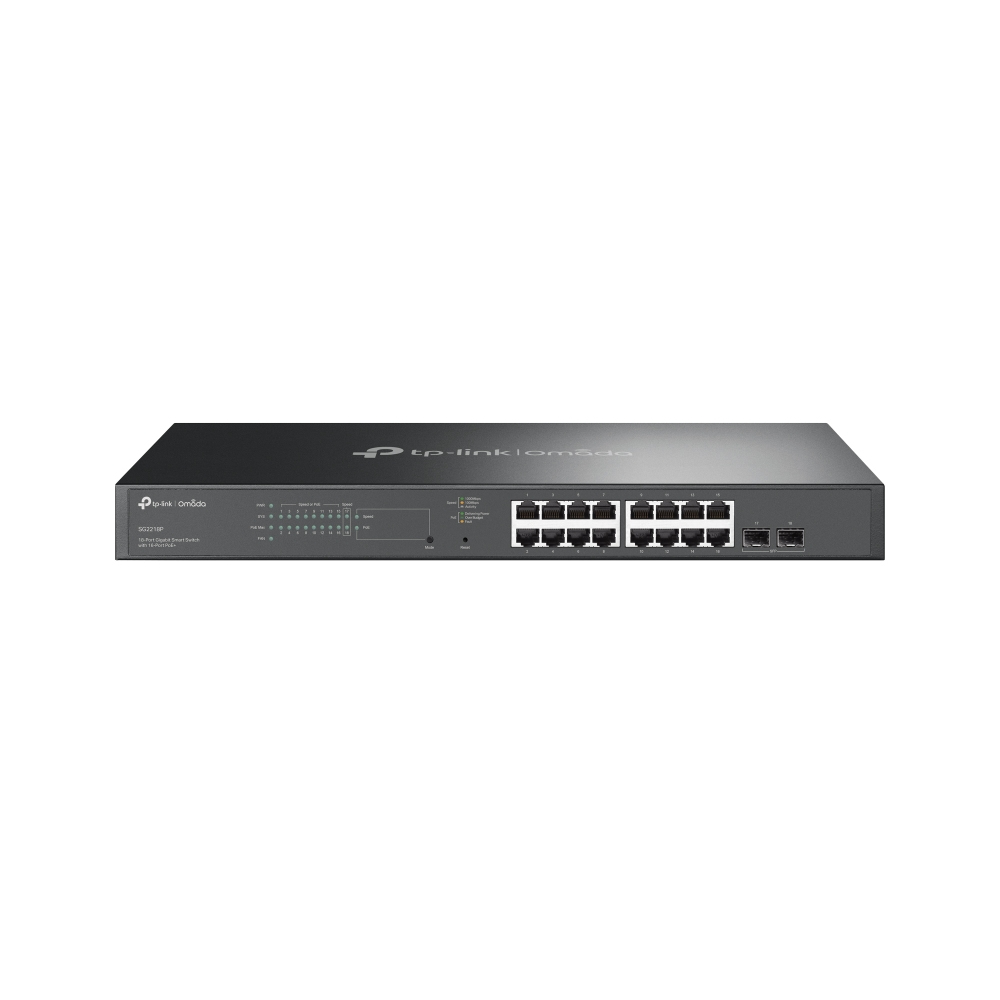
TP-Link Omada SG2218P network switch Managed L2/L2+ Gigabit Ethernet (10/100/1000) Power over Ethernet (PoE) 1U Black
TP-Link’s brand new Omada smart switches provide huge upgrade comparing with previous versions. Theswitches can be managed by Omada SDN Controller, which provides professional and reliable one-stepsolutions. Integrated L2 and L2+ features such as 802.1Q VLAN, QoS, IGMP Snooping and static routingprovide cost-effective networking solutions for small and medium-sized businesses without sacrificingenhanced usability and strong performance.
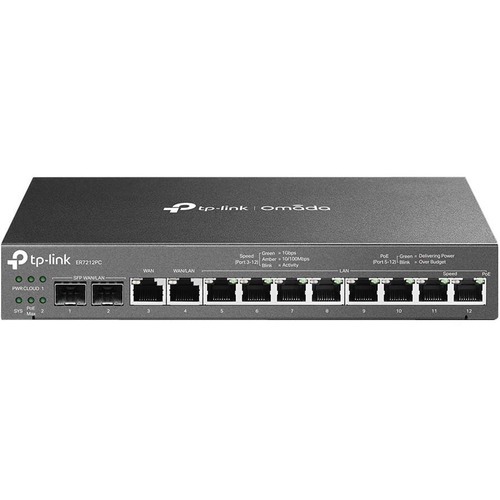
TP-Link Omada ER7212PC wired router Gigabit Ethernet Black
A Future-Proof, Versatile, and Compact Router with PoE+ Ports and Controller CapabilityOmada 3-in-1 Gigabit VPN Router3-in-1 Router, More Than A RouterThe 3-in-1 ER7212PC presents a one-stop solution for home and small business networking.With a single compact box, users can replace their router, hardware controller, and PoE+ switch setup. There is no need to manually configure various network devices one by one, you can perform unified deployment through ER7212PC. All you need is one device.Up to Four WAN Gigabit Ports to Optimize Bandwidth UsageEquipped with multiple ports, ER7212PC satisfies various internet access requirements through one device. The multi-WAN Load Balancing function distributes data streams according to the bandwidth proportion of every WAN port to raise the utilization rate of multi-line broadband.Easy Installation, Quiet Heat DissipationA clean, well-organized, and quiet network environment is at your fingertips.- The compact and minimalist design makes it suitable for your configuration in various spaces, whether it's the corner of office desks or the ceiling of a store.- Fanless design offers noiseless heat dissipation to your shops or offices.Easy Centralized ManagementWith built-in centralized management capability, the ER7212PC enables you to manage and update devices in bulk, with no need for individual and complex setups. Additionally, check the Omada app or web browser, ER7212PC allows you to remotely control connected devices, monitor the network, and view the network maintenance in real-time.High-Security and High-Performance VPNER7212PC supports pass-through traffic and multiple VPN protocols, including OpenVPN, IPSec, PPTP, and L2TP in Client/Server mode. One-click auto IPSec VPN simplifies VPN configuration and facilitates network management and deployment.Robust Security Features- Powerful FirewallAdvanced firewall policiesprotect your network and data.- Convenient VLAN SupportCreate virtual network segments forenhanced security and simplifiednetwork management.- DoS DefenseAutomatically detects and blocksDenial of Service (DoS) attacks suchas TCP/UDP/ICMP Flooding, Ping ofDeath, and other related threats.- IP/MAC/URL/Keyword FilteringForcefully prevent viruses and attacks from intruders.- IP-MAC BindingReserves static IP assignment forclients to defend against ARPattacks and spoofing.- One-Click ALG ActivationOne-Click ALG Activation forapplications such as FTP, H323, SIP,IPSec, and PPTP.
YEALINK NETWORK TECHNOLOGY YEALINK A30-020 - LEADING PLATFORM COLLABORATION BAR FOR MEDIUM ROOMS
YEALINK NETWORK TECHNOLOGY YEALINK A30-020 - LEADING PLATFORM COLLABORATION BAR FOR MEDIUM ROOMS
MANHATTAN/INTELLINET INTRACOM 1000BASELX (LC) SINGLEMODE PORT, 40 KM (25 MI.), WAVELENGTH 1550 NM
MANHATTAN/INTELLINET INTRACOM 1000BASELX (LC) SINGLEMODE PORT, 40 KM (25 MI.), WAVELENGTH 1550 NM

TP-Link RE550 network extender Network transmitter & receiver White 10, 100, 1000 Mbit/s
Boost Whole Home Wi-Fi with Your Existing RouterA single router has limited Wi-Fi coverage and always causes Wi-Fi dead zones. RE550 wirelessly connects to your existing router and expands its Wi-Fi signal into areas it can’t reach on its own. Enjoy your stable network experience wherever you are at home.Wi-Fi keeps Strongest for Unlimited MovingWith TP-Link Mesh Technology, it’s easy to form a Mesh network with a single Wi-Fi name for seamless whole home coverage. Just connect RE550 to a OneMeshTM router. Always enjoy the strongest Wi-Fi when you’re walking around with no need to search around for a stable connection.Smart RoamingUninterrupted streaming when moving around your home. One Wi-Fi NameNo more switching Wi-Fi network names. Easy CreationOneMesh™ Router + OneMesh™ Range Extender. Unified ManagementManage the whole unified network all in one Tether app.Enjoy a Mesh Network with Your Existing RouterWant a Mesh network? Hesitate on whether to replace your existing router and buy a Mesh set?TP-Link OneMesh™ resolves your dilemma.1 Update your existing TP-Link router’s firmware to OneMesh version—no need to replace it. 2 Connect the RE550 to the router. 3 Enjoy the Mesh networkFaster Dual Band Wi-Fi up to 1900 MbpsRE550 delivers dual band (2.4 GHz and 5 GHz) to transmit Wi-Fi signals, doubling the performance of each band. It enables you to keep more devices connected at the same time with its 600 Mbps 2.4 GHz and 1300 Mbps 5 GHz dual bands. Use the 2.4 GHz band to send email and browse the web and the 5 GHz band for gaming and HD streaming.Adaptive Path Selection: Keeps Itself Working at Top SpeedAdaptive Path Selection keeps your network running at optimal speeds by automatically choosing the fastest connection path to the router. Always keep your devices fast and stable—ideal for network environments crowded with many devices and applications.High Speed Mode: Maximized Speed with Dedicated BackhaulUses one dedicated Wi-Fi band as backhaul and another dedicated Wi-Fi band as an access point to maximize the bandwidth on the extended Wi-Fi.Built-In Access Point ModeRE550 is more than a wireless range extender. Simply plug an Ethernet cable into its Ethernet port and easily turn your wired internet connection into a 3×3 MIMO dual band wireless access point.Secure One-Touch Connection for Easy SetupStep 1: Simply press the WPS button on your router and, within 2 minutes, the WPS button on RE550 will connect to the network.Control at Your FingertipsSet up and manage your Wi-Fi through the TP-Link Tether app from your smartphone (Android, iOS), including TP-Link routers and range extenders.Step 2: Once connected, place RE550 at the best location—without reconfiguration.Maximum wireless signal rates are the physical rates derived from IEEE Standard 802.11 specifications. Actual wireless data throughput and wireless coverage are not guaranteed and will vary as a result of 1) environmental factors, including building materials, physical objects, and obstacles, 2) network conditions, including local interference, volume and density of traffic, product location, network complexity, and network overhead, and 3) client limitations, including rated performance, location, connection quality, and client condition.The product may not be compatible with routers or gateways with firmware that has been altered, is based on open source programs, or is non-standard or outdated.
Note: Search results and information may differ as they are provided by a third party.
In Stock*: Product stock is updated from the last business day and can change.
Item(s) added to cart
Netgear GS105E-200NAS ProSafe Plus Switch, 5-Port Gigabit Ethernet - 5 Ports - 2 Layer Supported - Wall Mountable - Lifetime Limited Warranty-None Listed Compliance
MFR: Netgear, Inc
Qty: 1
Part #: GS105NA