

StarTech.com USB31C2SAT3 laptop dock/port replicator Black
Connect a 2.5” or 3.5” SATA SSD/HDD to your USB-C enabled computer, with this USB 3.1 adapter cableThis USB-C to SATA adapter cable gives you fast and easy access to the data on your 2.5 in./3.5 in. solid-state drives and hard drives. The adapter cable lets you connect your USB-C enabled laptop or desktop computer directly to a SATA drive and access it through ultra-fast USB 3.1 Gen. 2 (up to 10Gbps). It’s the ideal accessory for your Dell XPS, MacBook, Chromebook or other USB Type-C enabled device.Convenient and versatile drive accessThe USB-C to SATA adapter cable lets you quickly swap your drives. You can copy or retrieve data from your 2.5 in. or 3.5 in. SATA drive, with no additional accessories required.The tool-free adapter cable is ideal for IT technicians who need fast access to SATA drives. It’s the perfect solution for data migration, drive cloning, and data backup or recovery applications, providing the fast performance of USB 3.1 Gen 2. You can also operate multiple adapters at the same time, when you need simultaneous access to many drives.Harness the speed of USB 3.1 Gen 2USB 3.1 Gen 2 gives you greater bandwidth and speed, with rates of up to 10Gbps - twice the speed of USB 3.0 (also known as USB 3.1 Gen 1). It lets you leverage the high performance of the latest SSDs and hard drives, while alleviating bottlenecks in your data transfers.Portable and easy to useThe compact, lightweight design of the USB-C to SATA adapter provides easy portability. The adapter features an integrated 1 m cable, so you never have to worry about forgetting to bring your connector cable with you. You can connect easily to a 2.5 in. solid-state drive or hard drive, using USB power, with no external power required. A universal power adapter is included for use when connecting to your 3.5 in. drives or for any 2.5 in. drives that may require additional power.The USB31C2SAT3 is backed by a StarTech.com 2-year warranty and free lifetime technical support.The StarTech.com Advantage- Connect a 2.5”/3.5” SATA drive to your USB-C enabled laptop or desktop computer, for quick access to your external data- Fast data transfer rates through USB 3.1 Gen 2 (10Gbps)- Integrated 1 m cable, for convenient use

Kensington Contour™ 2.0 Executive Balance Laptop Spinner — 15.6”
Kensington Contour™ 2.0 Executive Balance Laptop Spinner — 15.6”. Case type: Trolley case, Maximum screen size: 15.6", Carrying handle(s). Weight: 6.13 lbs (2.78 kg). Surface coloration: Monochromatic

HP Prelude Pro 15.6-inch Recycled Top Load
HP Prelude Pro 15.6-inch Recycled Top Load. Case type: Briefcase, Maximum screen size: 15.6". Weight: 13.4 oz (380 g). Surface coloration: Monochromatic

StarTech.com USBA2DPGB laptop dock/port replicator Wired USB 3.2 Gen 1 (3.1 Gen 1) Type-A Black
Portable Docking Station | USB 3.0 | Mac & Windows® | TAA CompliantThis USB to Dual DisplayPort Mini Dock provides your USB 3.0 laptop with connectivity for dual 4K 60 Hz monitors and Gigabit LAN - enabling you to quickly harness dual-display productivity and network connectivity.Increase Your Productivity with Two 4K MonitorsThe dual DisplayPort adapter adds two DP video outputs to your USB laptop, with resolution support up to 4K. Working on two monitors increases your productivity by giving you more screen space. You can simultaneously access multiple applications and reference material on one display while composing on the other.Access Hardwired Networks with a GbE PortEthernet ports on modern laptops are uncommon, and wireless networks are less secure and less reliable than a hardwired connection. With the GbE port on this portable docking station that features an Ethernet adapter you can access wired LANs even if your USB 3.0 laptop doesn’t have an Ethernet port.Maximize Portability with a Miniature Docking StationThe dock features a compact design that's perfect for business professionals who need portable office desk accessories for traveling between multiple office locations, or shared workspaces.The USBA2DPGB is TAA compliant and backed by a 3-year StarTech.com warranty and free lifetime technical support.The StarTech.com Advantage

Targus TTL314CA notebook case 14" Briefcase Black
- Patented SafePORT Air Protection System - Integrated iPad, Tablet or eReader pocket - Additional compartment includes two divided file sections - Durable Nylon material with water reststant bottom - Ergonomic Equalizer II strap with shock absorbant shoulder pad - Removable mesh accessory pouch

StarTech.com DK30CH2DPPD laptop dock/port replicator Wired USB 3.2 Gen 1 (3.1 Gen 1) Type-C Black, Silver
Laptop Docking Station | Mac & Windows® | 60W Power Delivery| 4K 60 DP + HDMIThis TAA compliant 4K USB-C™ dock for Mac and Windows® laptops takes productivity to a whole new level, with support for triple 4K monitors - a first in the market. The USB Type-C dock provides 60W charging power, and 5x USB 3.0 ports to connect your peripheral devices. It’s the perfect accessory for your Dell™ XPS 15, Chromebook Pixel™, or another USB-C enabled PC laptop.The dock also connects to USB 3.0 laptops with a USB-A port (using a USB-C to A cable such as the USB315AC1M, sold separately).Note: Power Delivery to charge your laptop is not available through USB-A, and only dual display is supported.Enhance ProductivityThe 4K USB-C Dock for Mac and Windows lets you create a three-monitor Ultra HD workstation. Connect:2x 4K DisplayPort (DisplayLink) at 4096 x 2160 resolution / 3840 x 2160 @ 60Hz and1x 4K HDMI (DP Alt Mode) at 4096 x 2160 resolution @ 24Hz / 3840 x 2160 @ 30HzFor high-resolution applications, the universal laptop docking station can also connect to a 5K display (5120 x 2880 resolution) at 60Hz, by connecting the two DisplayPort ports to a single 5K display.Powerful ConnectionsThis triple-monitor docking station lets you connect your peripherals to transform your laptop into a full-sized workstation. With five USB 3.0 ports (1x USB Type-C and 4x USB Type-A incl 1x Fast-Charge port), a Gigabit Ethernet port, headset jack and separate 3.5 mm audio and microphone ports, you have all the connections you need for maximum performance.60W Power DeliveryUsing a single cable, the USB-C docking station with Power Delivery (up to 60W) will power and charge your laptop, and power your peripherals with its 120W power adapter.The DK30CH2DPPD is backed by a StarTech.com 3-year warranty and free lifetime technical support.The StarTech.com Advantage

Targus DOCK192USZ laptop dock/port replicator USB 3.2 Gen 2 (3.1 Gen 2) Type-C Black
Expand your workstation and connect to virtually any laptop with the Universal USB-C® DV4K Docking Station with 100W Power with Legacy Host Power Kit. Designed to support and power a wide variety of laptops and operating systems, including Windows®, macOS®, Android™, Chrome OS™, and Ubuntu®, this dock packs all of the ports and power you need, whether you have a USB-C or USB-A host device.Enjoy sharp 4K video while supporting a connection up to two monitors with its two HDMI and two DisplayPort™ connections. Plus connect all your favorite accessories – like a mouse, keyboard, hard drive, and more – with a combination of USB-A (4x USB 3.2 Gen 1 Type-A ports) and USB-C (1x 3.2 Gen 2 Type-C), plus Ethernet and audio ports.Designed for the modern workstation, the dock comes equipped with a VESA® bracket mounting provision, which allows for use of the Targus VESA Mount Bracket (ACX003GLZ – sold separately) to hold your dock behind your display for even greater space savings.Supports Dual DisplayPort™ and HDMI MonitorsThe USB-C® Universal DV4K Docking Station with 100W Power is Thunderbolt™ 3 compatible, but that’s only the beginning. Enjoy two DisplayPort™ or two HDMI ports (or a mix of the two) with your dual display and create a picture-perfect image at 4K Ultra HD. Compare photos, documents, spreadsheets for work, or browse email with ease from screen to screen. Enjoy unbeatable compatibility all in one place using a single docking station with power.Connects and Powers USB-A and USB-C Host DevicesTruly universal, the DOCK192 connects and powers both USB-A and USB-C laptops. With the included Legacy Host Power Kit, you’ll be able to power any USB-C host up to 100W or a USB-A host up to 90W. Power Kit includes 5 charging tips and a DC cable to connect to the charging tip, plus a convenient tip holder to easily store those extra tips.All About the PortsWith one USB 3.2 Gen 2 Type-C port and four USB 3.2 Gen 1 Type-A ports, it’s simple to connect the latest keyboards, exterior drives, and other peripherals to customize your workspace experience. The dock also includes a fast-charging port for charging your smartphone, tablet, or other devices.Innovative DesignCompact and sleek, this patented dock is a sure fit for shrinking desktops and tight spaces. The dock is also equipped with a VESA® bracket mounting provision, which allows for use of the Targus VESA Mount Bracket (ACX003GLZ – sold separately) to hold your dock behind your display for even greater space savings.Innovative DesignCompact and sleek, this patented dock is a sure fit for shrinking desktops and tight spaces. The dock is also equipped with a VESA® bracket mounting provision, which allows for use of the Targus VESA Mount Bracket (ACX003GLZ – sold separately) to hold your dock behind your display for even greater space savings.Enterprise Software Suite: A Targus ExclusiveEnhance security and improve user experience with the Targus Enterprise Software Suite for DOCK192USZ.- Wi-Fi Auto Switch: auto enables/disables Wi-Fi functionality when the dock’s Ethernet connection is active, reducing unnecessary network traffic and enabling faster connection speeds. - MAC Address Cloning: auto replaces the MAC address of the connected Targus Ethernet network adapter with any (Wired Ethernet, Wireless Ethernet, Bluetooth) MAC address of the local host, supporting device-based authentication methods. - Ghost Device Removal: purges older, latent Targus docking station devices from the local registry preventing registry bloat.- Targus A/V Configuration Utility: restores audio configuration, icon, and first-level application window’s positions to external monitors when re-connecting to a previously used Targus docking station.

PLUGABLE MONITOR ADAPTER MDP TO VGA
Plugable - Adapter - Mini DisplayPort (M) to 15 pin D-Sub (DB-15) (F) screwable - DisplayPort 1.1 - passive, 1920 x 1200 (WUXGA) support, Unidirectional

StarTech.com LTSTND2IN1 laptop stand Silver 15"
Laptop Riser Stand | Tilted and Vertical Mount Options | For Ultra-thin Laptops 11" to 15"This 2 in 1 Aluminum Laptop Stand enables you to mount your laptop in two different positions depending on your application. Its aesthetic design provides function while maintaining an elegant silver look that matches your MacBook or other ultra-thin laptops. The 2 interchangeable silicone holders allow this stand to support laptops from 11" to 15" (14mm to 16mm in thickness) in an upright position, while protecting them from scratches and scuffing.Ergonomic designThis Laptop Stand provides you with two options for mounting your laptop to suit your desktop setup. Use it as a laptop tilted stand, giving you an ergonomic tilted position for your laptop (17°); or as a vertical laptop stand, to save space and keep your workstation organized. With the included bracket, this stand provides increased stability and weight distribution to your vertically mounted laptop.Increased AirflowWith its open frame, this Laptop Riser Stand offers increased airflow allowing your devices to stay cooler than if they were laying flat on your desk.Port AccessibilityThe Aluminum Laptop stand has been designed with an open frame design, so you can have all the ports on your laptop easily accessed to use with docking stations, and other peripherals in both mounting options.The LTSTND2N1 is backed by a StarTech.com 5-year warranty and free lifetime technical support.The StarTech.com Advantage
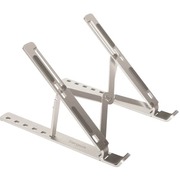
Targus AWE810GL laptop stand Aluminum 15.6"
OverviewReduce neck and eye strain with the Portable Ergonomic Laptop/Tablet Stand that puts your device in an optimal position for daily work. The adjustable design supports six different height options to deliver a comfortable angle for nearly any environment. Stylish and durable, the stand is made of high-quality aluminum with high heat reduction to help prevent your device from overheating. Compact and lightweight, the stand folds flat for easy portability and storage. A bonus grey pouch is also included for convenient carrying.
Note: Search results and information may differ as they are provided by a third party.
In Stock*: Product stock is updated from the last business day and can change.
Item(s) added to cart
Netgear GS105E-200NAS ProSafe Plus Switch, 5-Port Gigabit Ethernet - 5 Ports - 2 Layer Supported - Wall Mountable - Lifetime Limited Warranty-None Listed Compliance
MFR: Netgear, Inc
Qty: 1
Part #: GS105NA