
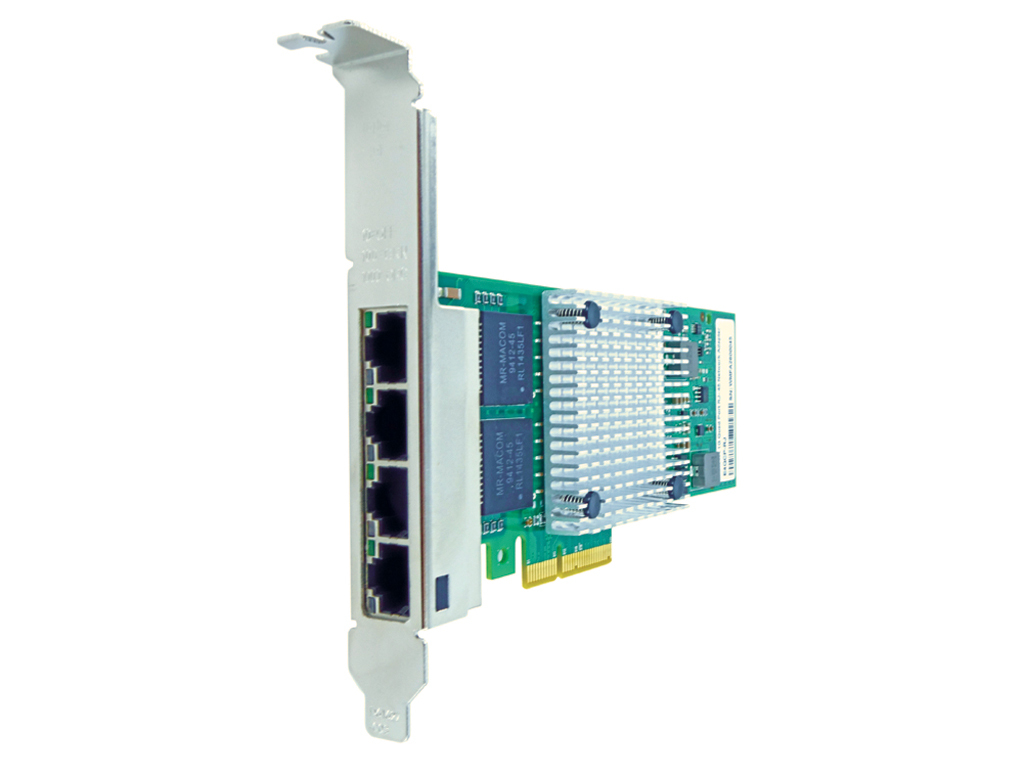
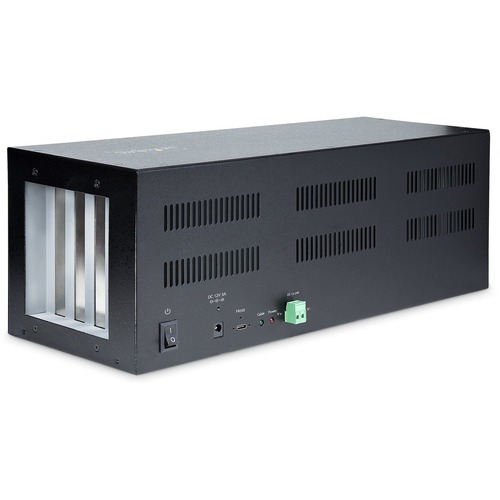
StarTech.com 4PCIE-PCIE-ENCLOSURE interface cards/adapter PCIe, Terminal
Steel Housing | Mounting Brackets | Screw-lock USB-C CableThe robust expansion chassis supports 4 PCIe x1 add-on cards and features up to 10Gbps of total bandwidth. The expansion chassis connects to the host using a proprietary USB-C PCIe x2 adapter card and a locking USB Type-C cable. Take advantage of features such as Wake-on-LAN (WoL), support for PCI Express Advanced Error Reporting (AER), backwards compatibility, and multiple power capabilities.External PCIe Expansion BoxThe chassis communicates with the desktop computer or server using a host card (PCIe 2.0 x2) in combination with the 5.9ft (1.8m) USB Type-C (USB-C) cable with screw-locks. The included low-profile bracket widens the compatibility as you can install the host card in small form factor (SFF) systems. Features support for PCI-E Advanced Error Reporting (AER) and EndPoint Cyclic Redundancy Check (ECRC). Both of these PCIe features to aid in establishing and maintaining PCIe connections between devices.The PCI Express expansion box does not require drivers to be installed. It is operating system independent and compatible with Windows, Linux, or macOS. Note: the expansion cards installed in the chassis may require drivers.Robust ConstructionThe expansion chassis is built with SECC galvanized steel, enabling it to operate in harsh environments. It features an operating temperature range of 32° to 140°F (0° to 60°C). The vented design of the chassis allows for passive cooling and quiet operation. Secure the enclosure to the desired location using the mounting brackets and included hardware.Power OptionsPower the expansion chassis via the PCIe Host Adapter Card with 5 or 12VDC delivered through the USB Type-C cable, the DC power adapter 12V 3A, or the terminal block port that supports 12 to 24VDC and 3A.ApplicationsThere are multiple application scenarios:• Upgrade or swap cards with ease.• Test hardware between multiple computers, operating systems, or with different devices/peripherals.• Maximize the I/O capabilities of the host system by installing Ethernet or fiber, USB, serial, or parallel PCIe cards.Avoid costly computer/server upgrades when more expansion slots are unavailable.The external PCIe slots for desktop is backed for two years, including free lifetime 24/5 multi-lingual technical assistance.The StarTech.com Advantage

GIGABYTE B650 AORUS ELITE AX 1.0 AMD B650 Socket AM5 ATX
Twin Digital VRM DesignTo ensure maximum Turbo Boost and overclocking performance of AMD's new generation CPU, GIGABYTE AORUS series motherboard equip the best VRM design ever built with the highest quality components.Ultra Durable™ SMD PCIe 5.0 x4 M.2 ConnectorThe first PCIe 5.0 x4 M.2 Slot supports the latest M.2 25110 form factor. Reinforced PCIe 5.0 M.2 connectors with metal shielding to provide higher strength.DDR5 EXPO & XMP Overclocking Up to 6600 and Beyond*AORUS is offering a tested and proven platform that the memory overclocking capability is able up to 6600 and beyond. All users need to do for achieving this extreme memory performance boost is to ensure that their DDR5 memory modules are AMD EXPO™/ Intel® XMP capable, the EXPO/XMP function is activated and enabled on their AORUS motherboard.OUTSTANDING THERMAL DESIGNGIGABYTE Motherboards' unparalleled performance is guaranteed by innovative and optimized thermal design to ensure the best CPU, Chipset, SSD stability and low temperatures under full load application and gaming performance.Wi-Fi 6E AdvantageSpectrum congestion is huge problem in current Wi-Fi environment nowadays because too many devices all use existing 2.4GHz and 5GHz spectrum, and it cause unreliable connection and slower speed. Wi-Fi 6E is extended standard to Wi-Fi 6, and it use dedicated 6GHz band that it provides not only brand new frequency to transfer data, but also spacious spectrum for future more devices. With Wi-Fi 6E, users can enjoy faster connection and stronger signal than before.Connecting the Future - Front USB 3.2 Gen 2x2 Type-CFeaturing the USB 3.2 Gen 2x2 design which is doubled the performance than previous generation of USB 3.2 Gen 2. It works up to 20Gbps ultra-fast data transfer while connecting to USB 3.2 compliant peripherals. Through the USB Type-C® connector, users can enjoy the flexibility of reversible connection to access and store massive amounts of data rapidly.Connecting the Future - Rear USB 3.2 Gen 2 Type-CAMD's native USB 3.2 Gen 2 provides USB 3.2 Gen 2 ports with speeds up to 10Gbps. With twice the bandwidth compared to its previous generation as well as backwards compatibility with USB 2.0 and USB 3.2 Gen1, the much improved USB 3.2 Gen 2 protocol is available over the new reversible USB Type-C™ and the traditional USB Type-A connector for better compatibility over a wider range of devices.High-End Audio CapacitorsAORUS motherboards use high-end audio capacitors. These high quality capacitors help deliver high resolution and high fidelity audio to provide the most realistic sound effects for gamers.Audio Noise GuardAORUS motherboards feature an audio noise guard that essentially separates the board’s sensitive analog audio components from potential noise pollution at the PCB level.RGB Fusion Multi-Zone Light Show DesignNow offering more LED customizations than ever, users can truly adapt their PC to represent their lifestyle. With full RGB support and a redesigned RGB Fusion 2.0 application, the user has complete control over the LEDs which surround the motherboard.Note: Lighting effects depicted are for demonstration purposes only. Actual lighting effects may vary by model.Friendly User InterfaceThe EASY MODE shows important hardware information in one page including CPU clock, Memory, Storage, Fan.ChangelogList all changes before saving and exiting bios. Quickly review overall settings modification.My FavoritesAdd constantly used items into the favorite menu for quick access.Intuitive Load Line CurveClearly show each loadline calibration setting in an intuitive curve graph.Storage InformationShow all kinds of storage information including SATA, PCIE and M.2 interface.Multi-keyA multi-function reset button that can be reconfigured to other function in BIOS for different user scenarios.EZ-LatchWith GIGABYTE EZ-Latch, you can DIY your PC in no time, quick and easy.Q-Flash PlusUpdate the BIOS easily without installing the CPU, memory and graphics card.With GIGABYTE Q-Flash Plus, you don't need to install the CPU, memory and graphics card nor enter the BIOS menu to flash the BIOS. Just download and save a new BIOS file (rename to gigabyte.bin) on the USB flash drive, then press the dedicated Q-Flash Plus button and you’re good to go!


Intel Core i7-13700KF processor 30 MB Smart Cache
Intel Core i7-13700KF. Processor family: Intel® Core™ i7, Processor socket: LGA 1700, Processor manufacturer: Intel. Memory channels: Dual-channel, Maximum internal memory supported by processor: 192 GB, Memory types supported by processor: DDR4-SDRAM, DDR5-SDRAM. Market segment: Desktop, Use conditions: PC/Client/Tablet, PCI Express slots version: 5.0, 4.0. Intel® Turbo Boost Max Technology 3.0 frequency: 5.4 GHz. Package type: Retail box

Intel Core i9-13900KF processor 36 MB Smart Cache
Intel Core i9-13900KF. Processor family: Intel® Core™ i9, Processor socket: LGA 1700, Processor manufacturer: Intel. Memory channels: Dual-channel, Maximum internal memory supported by processor: 192 GB, Memory types supported by processor: DDR4-SDRAM, DDR5-SDRAM. Market segment: Desktop, Use conditions: PC/Client/Tablet, PCI Express slots version: 5.0, 4.0. Intel® Turbo Boost Max Technology 3.0 frequency: 5.7 GHz, Intel® Thermal Velocity Boost Frequency: 5.8 GHz. Package type: Retail box

Intel Core i9-13900K processor 36 MB Smart Cache
Intel Core i9-13900K. Processor family: Intel® Core™ i9, Processor socket: LGA 1700, Processor manufacturer: Intel. Memory channels: Dual-channel, Maximum internal memory supported by processor: 192 GB, Memory types supported by processor: DDR4-SDRAM, DDR5-SDRAM. On-board graphics card model: Intel UHD Graphics 770, On-board graphics card outputs supported: Embedded DisplayPort (eDP) 1.4b, DisplayPort 1.4a, HDMI 2.1, On-board graphics card base frequency: 300 MHz. Market segment: Desktop, Use conditions: PC/Client/Tablet, Workstation, PCI Express slots version: 4.0, 5.0. Intel® Turbo Boost Max Technology 3.0 frequency: 5.7 GHz, Intel® Thermal Velocity Boost Frequency: 5.8 GHz

ASUS PRIME Z790-A WIFI Intel Z790 LGA 1700 ATX
PRIME Z790-A WIFIASUS Prime series motherboards are expertly engineered to unleash the full potential of 13th Gen Intel® Core™ Processors. Boasting a robust power design, comprehensive cooling solutions and intelligent tuning options, PRIME Z790-A WIFI provides users and PC DIY builders with a range of performance optimizations via intuitive software and firmware features.The ASUS PRIME Z790-A WIFI offers this all in a sleek, futuristic-looking package centered around a spaceship design aesthetic, with a silver-toned nameplate and chipset cover.FLEXIBILITYComprehensive controls form the foundation of the ASUS PRIME series. The PRIME Z790-A WIFI motherboard packs flexible tools to tune every aspect of your system, enabling performance tweaks to perfectly match the way you work to maximize productivity.Intelligent ControlASUS Intelligent Control makes your PC smart. Along with taking care of complex tuning and dynamically optimizing essential aspects of your system, it offers intelligently simplified options for newcomers to PC DIY, as well as more comprehensive features for seasoned veterans.All-Around Energy EfficiencyThe Power Saving function contains several settings can easily optimize power consumption and maximize energy savings. You can enable a CPU power limit, darken Aura lighting, and set the fan profile to a power saving mode. You can also toggle the Power Saver plan that is built into Microsoft Windows.COOLINGPRIME Z790-A WIFI motherboard is engineered with multiple onboard heatsinks and an array of hybrid fan headers to ensure your rig stays cool and stable under intense workloads.M.2 HeatsinksThree M.2 heatsinks cover four M.2 slots, warding off throttling that can occur with M.2 storage during sustained transfers.VRM Heatsinks and Thermal PadsThe extensive surface area of the massive heatsinks cover the VRMs and chokes to improve heat dissipation. Together with specially engineered thermal pads, they improve heat transfer from the MOSFETs and chokes for better cooling performance.Cooler by DesignPRIME Z790-A WIFI features comprehensive cooling controls that are configurable via Fan Xpert 4 software or via the UEFI BIOS.Multiple Temperature SourcesEach header can dynamically reference three thermal sensors. Fan Xpert 4 allows you to map the temperature of supported ASUS graphics cards to optimize cooling for GPU- and CPU-intensive tasks.AIO Pump HeaderA dedicated PWM/DC header for self-contained water-cooling setups.PERFORMANCEThe PRIME Z790-A WIFI motherboard is built to handle the high core counts and bandwidth demands of 13th Gen Intel® Core™ Processors. ASUS Z790 motherboard provides all the fundamentals to boost daily productivity, so your system will be ready for action with stable power, intuitive cooling and flexible data transfer options.Robust Power DesignStable power is essential to extract every last bit of performance out of Intel processors. The PRIME Z790-A WIFI is geared to cater to the demands of these high-core-count CPUs.ProCool ConnectorsProprietary connectors augment the motherboard's link to the PSU with 8+8 pin connectors that pass 12 volts of power directly to the processors. Each jack features solid pins that can handle more current than hollow-pin connectors.Outstanding AudioCombined onboard features deliver elevated audioIntelligent design and premium hardware create audio quality unlike anything you’ve ever experienced.

TP-Link Archer TX20U Plus WLAN 1800 Mbit/s
Level Up Your PC with WiFi 6High-Gain Wireless USB AdapterYour Upgrade to WiFi 6Forget about buying a new PC. TX20U Plus delivers powerful dual band WiFi 6 straight to your device for exceptional connectivity and speed up to 1800 Mbps.Coverage Powered by BeamformingHigh-gain antennas combine with Beamforming to concentrate WiFi signals towards your router for better reception and reliable connections from far away.Escape the Congestion with MU-MIMOExperience flawless streams, gameplay, and uploads while your network simultaneously processes bandwidth for multiple devices.Lower Your Ping with OFDMAWorking with a compatible router, your PC receives data at the same time as other devices on the same stream. This means next-to-nothing lag for video and games.A Perfect Match for Faster SpeedsUSB 3.0 ensures there’s no bottleneck between TX20U Plus and your PC.Adjustable, Multi-Directional AntennasRotate and adjust the antennas 180° for the best reception from any location.Simple Design and PlacementFind the best spot for network reception with TX20U Plus’s desktop-friendly design and 1-meter USB cable.
Item(s) added to cart
Netgear GS105E-200NAS ProSafe Plus Switch, 5-Port Gigabit Ethernet - 5 Ports - 2 Layer Supported - Wall Mountable - Lifetime Limited Warranty-None Listed Compliance
MFR: Netgear, Inc
Qty: 1
Part #: GS105NA