

StarTech.com STNDTBLTMOB multimedia cart/stand Black Tablet Multimedia stand
Mobile Tablet Stand | Height Adjustable | Detachable HolderThis rolling tablet floor stand is perfect for delivering presentations and rolling your tablet in environments such as healthcare, education, tradeshows etc. The stand fits tablets from 6.6" (16.8cm) to 7.8" (20cm) in width and up to 0.41" (10.5mm) in thickness. Use it with your Apple iPad (including the 10.2 iPad, and 11" iPad Pro) or other compatible tablets.Perfect for PresentationsThis tablet stand on wheels enables you to use your tablet to deliver engaging presentations, while you stay focused on your audience and the content you're delivering. You can use your tablet as a visual cue or teleprompter, without having to hold it or repeatedly look down at it while you're speaking.With lockable casters and a strong base; this mobile tablet holder offers a great balance between mobility and stability, perfect for photography, videography, and educational environments.Adjustable Height and Viewing AngleThe ergonomic tablet stand has a height adjustability range of 36.4" to 57.8" (92.5cm to 146.8cm) from the floor so you can adjust it to your ideal height; whether you are sitting or standing.With full articulation, this tablet holder lets you swivel, rotate, and tilt your tablet to adjust the viewing angle and reduce neck strain while improving your ergonomic posture.Portable Detachable Tablet HolderThe universal tablet stand comes with a detachable tablet holder. If you need to hold the tablet in your hands, simply detach the tablet holder from the stand and take the tablet with you.The StarTech.com Advantage

StarTech.com ADJPROJCART multimedia cart/stand Black Projector Multimedia stand
Portable Projector Cart with Laptop Tray | Height Adjustable | Cable ManagementThis all-steel projector and laptop stand enables you to setup a mobile multimedia workstation that you can easily move between classrooms, boardrooms, and conference rooms. It has two device platforms that each support 22lb (10kg). This rolling cart is equipped with durable casters (2 lockable) that provide ease of transportation.Setup FlexibilityWith the two integrated device trays, this mobile projector trolley adjusts to your needs letting you choose where to mount your projector, laptop, and other media devices. Both trays have safety ledges that help prevent your equipment from sliding.The upper tray has surface area of 13.8"x11.8" and lets you setup a laptop or projector depending on your needs. You can adjust its height (37.4" to 57" from the floor) and tilting angle (+/-12°) to provide a better viewing experience that will adjust to your presentation needs. Adjustments can be made by hand via the rotary knob locks.The lower tray has a surface of 14.4"x11.8" and it sits at 27" from the floor.Security and StabilityWith a base area of 17.9"x19.7"; this AV projector will comfortably support a combined load of 20 kg. For added security, you can keep your devices in place by running straps through the thin openings of the top and bottom trays (straps not included). Additionally, this cart comes with 2 cable management clips that will let you run your cables through the pole in a tidy and safe manner; and help with the transportation of your setup.ADJPROJCART is backed by a StarTech.com 5-year warranty and free lifetime technical support.The StarTech.com Advantage

Viewsonic VB-STND-008 multimedia cart/stand Black Universal Multimedia cart/trolley
The VB-STND-008 motorized trolley cart securely accommodates ViewSonic 55”, 65”, 75”, and 86“ ViewBoard interactive flat panel displays, or any similar displays weighing up to 75 kg. Thanks to integrated on-screen control, the trolley's height can be easily adjusted using the ViewBoard app toolbar without class interruption. Designed for safety and equipped with 360-directional quiet wheels, this mobile cart lets you securely and silently move the ViewBoard display from room to room for easy sharing of resources.ViewBoard Integration for Smooth and Easy TeachingThe motorized trolley cart isn't only for height adjustment, but also works as a ViewBoard power source. The connectivity and control bar compatibility between the ViewBoard and the trolley facilitates better lesson delivery without disrupting the flow.Adjustable Height for Any AgeThe motorized adjustable height function increases the learning engagement of all students by giving everyone equal reach to the ViewBoard. The trolley can be raised up to 22 inch (560 mm) at the command of a Control Pad, ViewBoard Apps, or Control buttons making for a more intuitive and more inclusive classroom.Flexible Positioning for Group LearningThe Electric Tilt function allows for the ViewBoard to be effortlessly switched between vertical and horizontal position to best match individual studying, group activities, or team discussions.Designed to Be Accessible by AllAccessible design maximizes the learning possibilities for all students.The trolley was created to enhance digital accessibility in the classroom providing easy contact with the touchscreen for users of any height and any mobility limits.Swift and Silent Wheels for Convenient MovabilityLarge, 360-directional wheels roll smoothly and with ease. Moving within the classroom and the lecture hall doesn't interrupt the class or lecture flow while switching between rooms and venues becomes effortless and quick.Designed for a Safe Learning EnvironmentThe trolley embodies the latest safety features. The vertical moving automatically stop when sensing the obstacle which prevents any possible hand or finger injuries. The locking caster wheels eliminate the danger of tipping over or moving away from the user.Designed to Keep All Your Accessories OrganizedEvery part of the motorized trolley cart has been created to optimize organization. The cord clamp design solves cable clutter problems once and for all. Laptops, tablets, and any additional devices can be securely held on the adjustable keyboard tray. Finally, both the magnetic control pad and the caster cover can be conveniently placed at an easy-to-reach location.
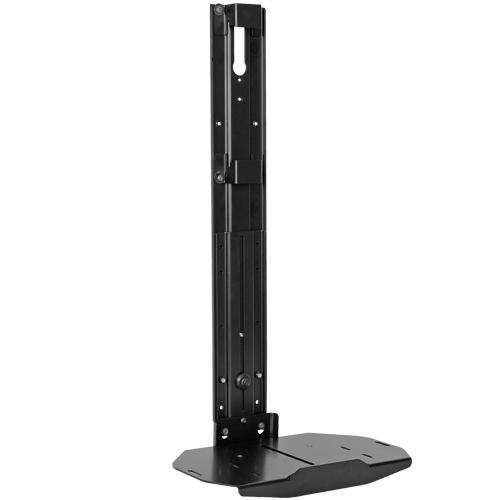
Chief FCA811 multimedia cart accessory Black Shelf
Features- 14" wide shelf sits above or below display to hold AV components- Lip on end of shelf prevents components from sliding off- Height extension range from 18.0 - 30.8"- Height adjustable for 62 to 100" displays- TAA Compliant


Compulocks MAGNETIX SECURED TABLET CAPSULE
Compulocks MAGNETIX SECURED TABLET CAPSULE
SAFCO 4P EX LTR 4224-86IN 8T ADDER
SAFCO 4P EX LTR 4224-86IN 8T ADDER
SAFCO 4P EX LGL 2430-97IN 9T ADDER
SAFCO 4P EX LGL 2430-97IN 9T ADDER
SAFCO ARC/THE BOX LGL 6TR ADDR EMPTY
SAFCO ARC/THE BOX LGL 6TR ADDR EMPTY
Note: Search results and information may differ as they are provided by a third party.
In Stock*: Product stock is updated from the last business day and can change.
Item(s) added to cart
Netgear GS105E-200NAS ProSafe Plus Switch, 5-Port Gigabit Ethernet - 5 Ports - 2 Layer Supported - Wall Mountable - Lifetime Limited Warranty-None Listed Compliance
MFR: Netgear, Inc
Qty: 1
Part #: GS105NA