
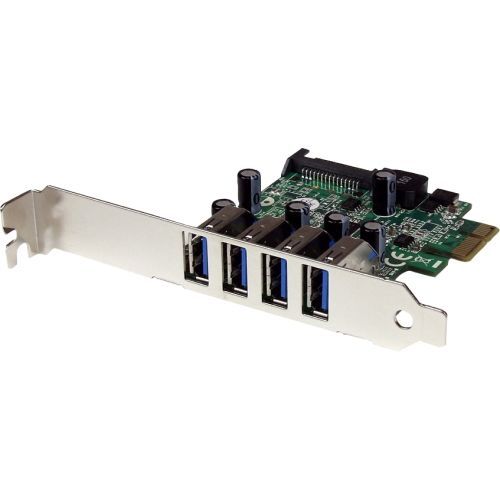
StarTech.com PEXUSB3S4V interface cards/adapter Internal USB 3.2 Gen 1 (3.1 Gen 1)
Add 4 external USB 3.0 (USB 3.2 Gen 1) ports to a low profile or standard computer, through PCI ExpressThe PEXUSB3S4V PCI Express USB 3.2 Gen 1 Card (with SATA Power) adds 4 external USB 3.2 Gen 1 ports to any PCI Express-enabled computer system with support for data rates up to 5 Gbps, while remaining backward compatible with USB 2.0 / 1.x devices.Enhanced with UASP support (USB Attached SCSI Protocol), this USB 3.2 Gen 1 controller performs up to 70% faster than conventional USB 3.2 Gen 1 when paired with a UASP supported enclosure (Note: UASP requires a compatible operating system). Using a more efficient protocol than the traditional USB BOT (Bulk-Only Transport), UASP technology optimizes transfers by allowing multiple commands to be processed simultaneously, significantly increasing transfer speeds for less wait time on data transfers. See our UASP test results below for further details.The card uses a "stacked" port layout that places the ports one on top of the other, enabling all four USB 3.2 Gen 1 ports to be external facing, while still allowing the card to fit into a small form factor/low profile computer system using the included low profile bracket.Plus, with a built-in SATA power connector, each USB port can provide up to 900mA of power to devices that draw power from a host bus connection (500mA for USB 2.0) by connecting to your computer power supply.Backed by a StarTech.com 2-year warranty and free lifetime technical support.Improved Performance with UASPUASP is supported in Windows® 8 and Server 2012. In testing UASP performed with up to a 70% faster read / 40% faster write speed over traditional USB 3.2 Gen 1 at peak performance.At the same peak in testing, UASP also showed up to an 80% reduction in required processor resources.Test results were obtained using an Intel® Ivy Bridge system, StarTech.com add-on USB 3.2 Gen 1 cards, a UASP-enabled StarTech.com enclosure, and a SATA III solid state drive.The StarTech.com Advantage
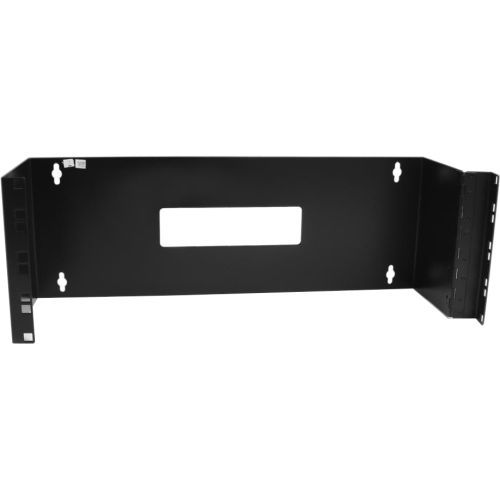
StarTech.com WALLMOUNTH4 rack cabinet 4U Wall mounted rack Black
Wall mount a patch panel or network switch while providing hinged access to the back of the device(s)The WALLMOUNTH4 4U 19in Hinged Wall Mounting Bracket for Patch Panels is 6in deep and sturdily designed to provide a dependable solution for mounting a patch panel, or other slim 19in networking equipment to a wall.The patch panel wall mount features a hinged design for easy access to configuration buttons, ports and cables. The wall mounting holes are spaced 16 in. apart, making it suitable for mounting on almost any wall, based on common wall-frame stud spacing.Backed by a StarTech.com 2-year warranty.The StarTech.com Advantage

StarTech.com PR42GI-NETWORK-CARD network card Internal Ethernet 2500 Mbit/s
Quad-port PCIe network card with Intel® I225-V chip features multi-Gigabit speeds with NBASE-T supportThis quad-port 2.5GbE network interface card (NIC) features independent Intel I225-V chipsets for each port with Intel vPro technology, to enhance performance and data integrity across four 2.5G ethernet connections. The variable multispeed options (2.5/1Gbps and 100/10Mbps) enable support for both new and legacy network hardware. Utilize existing Cat5e or CAT6 cabling infrastructure while adding NBASE-T (802.3bz) compatibility for seamless integration.Increased Network SpeedThe PCIe network card leverages Intel vPro technology for remote management and troubleshooting capabilities. Improve bandwidth for data-intensive applications, network sharing, FTPs, online or local storage/backup, and the streaming of online content - while reducing network slowdowns. Access up to 2.5GBASE-T speeds using Cat5e (or better) cabling, to maximize existing networks and equipment. To ensure reliable performance, four Intel I225-V chipsets are used, providing independent Ethernet controllers to each port.Enhance Existing HardwareThe network interface card connects via an available x4 PCI Express 2.0 (or higher) expansion slot. The card ships in a standard-profile bracket and includes a low-profile bracket for installation into small form factor systems and servers. This ethernet NIC card is compatible with Windows, Windows Server, and Linux.This card supports the following advanced features: PXE Boot, WoL, VLAN tagging, 9 K jumbo frame, full-duplex, and Intel vPro technology.The StarTech.com Advantage
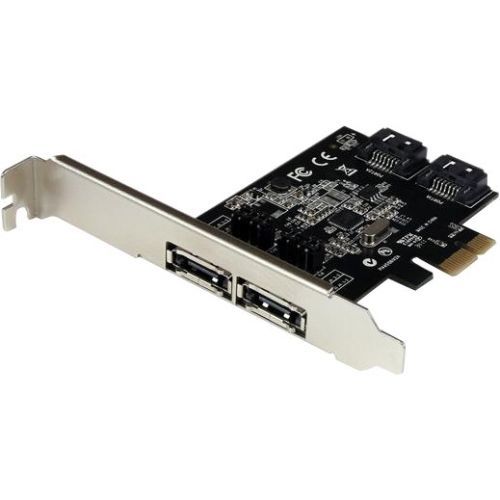
StarTech.com PEXESAT322I interface cards/adapter Internal SATA
Add 2 external or internal SATA 6 Gbps ports to a computer, through a PCI Express slotThe PEXESAT322I PCI Express SATA III Controller Card (6 Gbps) gives you the option to add 2 internal or external SATA ports to your computer, through a single PCI Express (x1) card slot. The card features on board jumper selection, which enables you to configure the card to provide 2 internal or external SATA III ports, or one of each, as needed.The SATA III card features Port Multiplier (PM) support on each port, which allows multiple drives to be connected over a single cable when necessary to maximize the number of SATA device connections while reducing the amount of cabling required.The card is fully compliant with the SATA revision 3.0 specification (up to 6Gbps of data bandwidth), enabling you to utilize the speeds of high performance hard drives and Solid State Drives (SSD), as well as SATA-based optical drives (CD-ROM, DVD-ROM, Blu-Ray).The PEXESAT322I SATA III Controller card is backed by our 2-year manufacturer warranty and free lifetime technical support.The StarTech.com Advantage
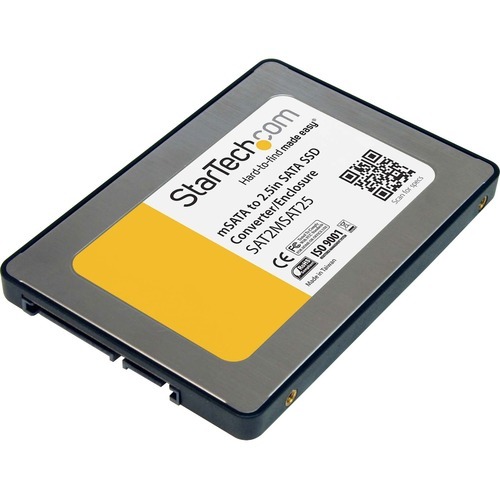
StarTech.com SAT2MSAT25 interface cards/adapter
Convert an mSATA mini-SSD into a Standard 2.5in SATA SSDThe SAT2MSAT25 2.5in SATA to Mini SATA SSD Adapter Enclosure turns an mSATA (Mini SATA) mini-SSD into a standard 2.5in SATA SSD for use anywhere a 2.5in SATA drive can be used.To maximize performance and utilize the full speed potential of your SATA III hard drives, this HDD Backplane supports SATA III for transfer speeds up to 6 Gbps when paired with compatible controller.Featuring all of the standard mounting points that a normal 2.5in hard drive uses, the converter can be installed into External Hard Drive Enclosures, Hard Drive Docking Stations or into desktop or laptop computers. The enclosure also features a unique design that enables seamless data pass-through with no conversion bottlenecks, enabling the mSATA drive to work as fast as it's allowed by the host system/interface.The StarTech.com Advantage- Maximize performance, with file transfer speeds up to 6Gbps when paired with SATA III HDD and controller- Fits virtually any full-length mSATA Solid State Drive into an housing that is identical to a standard 2.5in SATA drive- A completely pass-through design allows for the mSATA drive to operate at full capacity without any conversion bottleneck
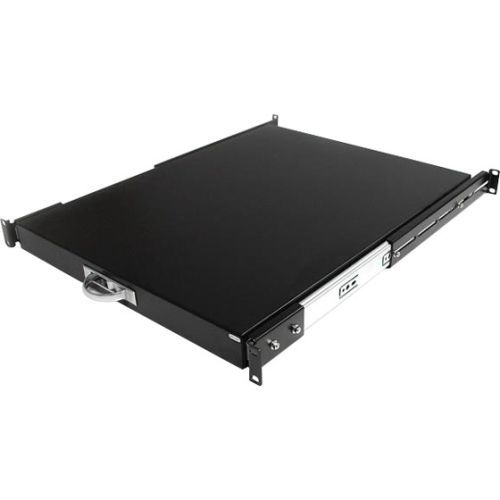
StarTech.com SLIDESHELFD rack accessory Adjustable shelf
Add a sturdy, sliding shelf for easy peripheral and equipment access in your server rack or cabinetThe Black SLIDESHELFD 22in Deep Sliding Server Rack Cabinet Shelf lets you add a 2-in-1 slide-shelf / keyboard tray that helps you keep costs down and productivity up.As your server cabinet needs change, the SLIDESHELFD changes to suit by allowing you to use it as a sturdy sliding shelf, or a 1U pull out drawer with a weight capacity of 55 pounds. Simply flip the installed drawer over and it becomes a shelf to hold monitors, laptops and other diagnostic equipment. An easy-to-hide handle pulls out to help you get a grip on the situation and hides away quickly.The rack shelf includes all of the tools needed for installation, and is compatible with standard 19in racks and cabinets with a 22in depth, including the StarTech.com 7236CABINET, RK2236BKF, RK4236BK, and RK4236BKNS DuraRak cabinets.The StarTech.com Advantage

StarTech.com ST1000SPEXD4T network card Internal Ethernet 1000 Mbit/s
Add two 10/100/1000Mbps Ethernet ports to any PC through a PCI Express slotThis TAA-compliant Gigabit Ethernet card adds two gigabit Ethernet interfaces to a desktop or server.Plug And Play CompatibleThis 2-port network interface card is plug-and-play compatible, with drivers that auto-install on major operating systems such as Windows, Windows Server, and Linux. It is compatible with Intel and AMD hardware platforms equipped with PCI Express x1, x2, x4, x8, or x16 slots.Performance and ManagementThis network card features link speed and activity LED indicators for visual network speed verification and issue diagnosis.This PCIe network adapter supports 9K jumbo frames to minimize packet overhead, Wake-on-LAN (WoL) for remote system booting, auto-negotiation between 10/100/1000Mbps, and VLANs for streamlined network management.Universal FitThe PCI Express NIC includes a pre-installed standard-profile bracket for full-sized desktops and servers, as well as a low-profile bracket for compatibility with small form-factor computers.The StarTech.com Advantage
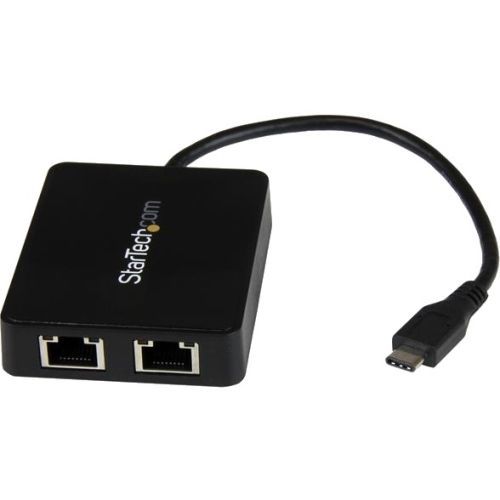
StarTech.com US1GC301AU2R network card USB 5000 Mbit/s
Use the USB-C port on your laptop to add LAN access with two Gigabit Ethernet ports and a USB 3.0 (Type-A) portNow, you can add wired network access through the USB-C™ or Thunderbolt™ 3 port on your laptop or desktop computer, and connect to your USB 3.0 (Type A) devices with ease. This Gigabit Ethernet network adapter gives you access to two reliable GbE ports, and without having to install drivers. It's a great companion for your MacBook, Chromebook Pixel™, Dell™ XPS™ 12, Dell Latitude™ 12 7000 Series 2-in-1 or another device that has a USB Type-C™ port.Powerful Gigabit network connectionsThe network adapter leverages the 5Gbps speed of USB 3.0 (also known as USB 3.1 Gen 1) to deliver the full bandwidth of your Gigabit network connection, without bottlenecks. This saves you time by making it easier to access very large files over your network at Gigabit speed.For added versatility, the network adapter supports a range of convenient features, such as Wake-On-LAN, VLAN Tagging, Crossover Detection and Auto-Correction (Auto MDIX), Checksum Offload (IPv4, IPv6, TCP, UDP), and Large Send Offload.Add connectivity to your USB devicesSome computers with USB Type-C only offer one USB-C port for external connectivity, which will not connect with your existing USB Type-A devices. This Gigabit adapter features an integrated USB 3.0 Type-A port, so while the adapter is connected to your computer to provide network access, you can also connect to USB peripherals that need a USB Type-A connector. The network adapter is also backward compatible with USB 2.0 systems.Native driver support makes installation easyGet up and running quickly. The network adapter provides native driver support to ensure a quick setup. Simply plug the adapter into the USB Type-C port on your laptop and connect to your network. The network adapter chipset offers native driver support in Chrome OS™ and Windows® 8.1, and supports Mac OSX (10.10) with driver installation.Trouble-free connections through USB-Type-CThe USB Type-C connector is smaller and easier to use than previous USB connectors. It’s a reversible plug, so you can connect to your devices with either side facing up. You can insert the cable the right way every time, without frustration or the risk of port damage.Enhance Productivity and Device Management with the StarTech.com Connectivity Tools ApplicationDeveloped to improve performance and security, StarTech.com Connectivity Tools is the only software suite on the market that works with a wide range of IT connectivity accessories. The software suite includes:•Mac Address Pass-Through Utility : To improve network security.•Wi-Fi Auto Switch Utility : Enabling users to quickly access faster network speeds via wired LAN.For more information and to download the StarTech.com Connectivity Tools application, please visit: www.StarTech.com/Connectivity-ToolsThe US1GC301AU2R is backed by a StarTech.com 2-year warranty and free lifetime technical support.The StarTech.com Advantage
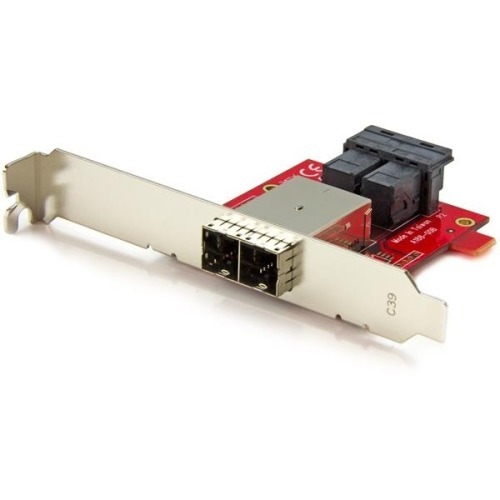
StarTech.com SFF86448PLT2 interface cards/adapter Internal Mini-SAS HD
This Mini-SAS adapter lets you convert two internal SFF-8643 ports on a controller card into two external SFF-8644 ports. This enables you to connect external SAS or SATA drives in devices such as a Direct Attached Storage (DAS) device to an internal backplane or SAS controller for additional storage.The adapter can connect up to eight drives in total and is compatible with 12Gbps SAS drives as well as 6Gbps SATA drives. For a hassle-free installation, you can mount the adapter into any new or legacy desktop expansion slot, including: PCI, AGP, and PCIe. To ensure compatibility with most computer cases, full-profile and low-profile mounting brackets are included.The SFF86448PLT2 is backed by a StarTech.com 2-year warranty and free lifetime technical support.
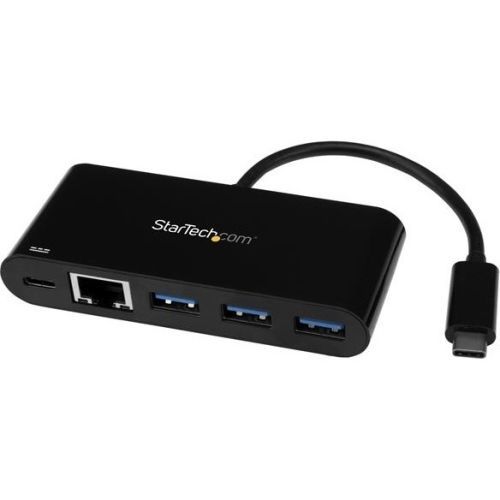
StarTech.com US1GC303APD network card Ethernet 5000 Mbit/s
Connect to a GbE network plus add three USB Type-A ports and PD Charging through your laptop’s USB-C portAdd powerful connectivity to your USB-C enabled laptop, tablet or desktop computer. Ideal for mobile use, this USB-C to Ethernet adapter plugs into your USB-C or Thunderbolt™ 3 port to provide wired network access, and gives you three USB 3.0 Type-A ports to connect your peripheral devices. Plus you can charge your laptop as you work. It makes a great companion for your MacBook, Chromebook Pixel™, Dell™ XPS 12, or other device.Access reliable Gigabit network connectionsGain a wired internet connection virtually anywhere you go. The USB-C network adapter provides an Ethernet port that supports full Gigabit bandwidth by harnessing the performance of USB 3.0 (5 Gbps), also known as USB 3.1 Gen 1. You can connect to a network in locations where Wi-Fi® is unavailable or unreliable, and quickly access large files over the network at Gigabit speed.Enhance productivity with a 3-port USB hubSome USB Type-C laptops, tablets and computers have only one port for external connectivity, which limits the number of peripheral devices you can use. This USB-C Ethernet adapter features a built-in hub with three USB Type-A ports, giving you the freedom to attach additional devices, such as a USB mouse or flash drive. You can expand the number of USB ports you have to enhance your productivity.Gain easy portabilityTravel-sized and self-powered, this USB-C network adapter and hub provides easy portability, tucking easily into your laptop bag and eliminating the need to carry a separate Gigabit Ethernet adapter and USB-C to USB-A hub. It’s ideal for mobile use, providing you with wired network connectivity wherever you go, and letting you plug in extra USB peripheral devices. It also has a built-in USB-Type-C cable so it’s always there when you need it.Power and charge as you workThe USB-C network adapter lets you power and charge your laptop as you work, while powering the hub at the same time. The adapter supports Power Delivery 2.0, so instead of carrying multiple power adapters, you can use your laptop’s USB-C power adapter to power both your laptop and network adapter. Note: just make sure your laptop’s USB-C based power adapter supports USB Power Delivery 2.0.Install it with easeGet up and running quickly. Simply plug the adapter into the USB Type-C™ port on your laptop and connect to your network. It automatically installs once you connect it, and works with a wide range of operating systems such as Windows®, macOS, Linux® and Chrome OS™.The US1GC303APD is backed by a StarTech.com 2-year warranty and free lifetime technical support.The StarTech.com Advantage
Item(s) added to cart
Netgear GS105E-200NAS ProSafe Plus Switch, 5-Port Gigabit Ethernet - 5 Ports - 2 Layer Supported - Wall Mountable - Lifetime Limited Warranty-None Listed Compliance
MFR: Netgear, Inc
Qty: 1
Part #: GS105NA