


Kramer Electronics KRAMER WIRELESS HIGH DEFINITION TRANSMITTER/RECEIVER
Kramer Electronics KRAMER WIRELESS HIGH DEFINITION TRANSMITTER/RECEIVER
Axiom AXIOM 5-IN-1 MALE USB-C TO DUAL HDMI, VGA, USB-C PD AND USB-A 3.0 NCNR
Axiom AXIOM 5-IN-1 MALE USB-C TO DUAL HDMI, VGA, USB-C PD AND USB-A 3.0 NCNR

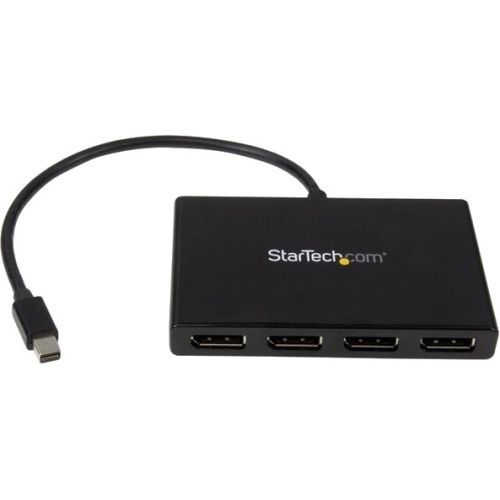
StarTech.com MSTMDP124DP video splitter Mini DisplayPort 4x DisplayPort
Use this adapter to connect four independent displays to a single mDP 1.2 portThis MST hub lets you connect four monitors to your Mini DisplayPort™ (mDP) 1.2 equipped Windows® tablet, laptop or desktop.Increase productivity with multiple screensThe newest generations of computers are more portable than ever, which often means that you're left with fewer video outputs and smaller integrated screens. This MST hub solves both of these problems by letting you connect four additional displays to your computer, which makes multitasking much easier.Connect to any displayWith the MST hub, you can use Mini DisplayPort video adapters and cable adapters that enable you to connect HDMI, VGA or DVI displays. This ensures that your MST hub will be compatible with virtually any television, monitor or projector. The hub is VESA and DisplayPort certified to support DP 1.2 enabled systems, for seamless integration with your existing video equipment.Configure your displays for any environmentUsing the MST hub, you can extend your desktop onto additional monitors and stream independent content to each display, giving you the freedom to multitask and increase your productivity. You can also mirror the same image onto multiple displays for remote viewing applications such as digital signage.Enjoy amazing video quality, without draining system resourcesMST technology uses your existing video card to minimize the use of system resources while delivering Ultra HD 4K resolutions. This unprecedented performance makes MST perfect for high-resolution applications such as graphic design, gaming and medical imaging.Note: When using a DisplayPort 1.1 video card the MSTMDP124DP will act as a splitter, automatically mirroring your video source across all displays. Resolution limitations apply.The MSTMDP124DP supports plug-and-play installation for a hassle-free setup, and is backed by a StarTech.com 3-year warranty and free lifetime technical support.Notes: MST shares 21.6 Gbps across all attached displays. Higher resolutions can restrict the available bandwidth with the remaining ports, please see our guideline below for determining an ideal resolution for your setup. Certain graphics adapters have limited MST support and will only output to three displays in total. If more than three monitors are attached, the fourth will be disabled.The Surface Pro 3, Surface Pro 4, and Surface Book only support the use of three displays in total. If this device is used with the Surface Pro 3, and three external monitors, the built-in touch screen on your Surface will be disabled.Average resolution bandwidth allocation1920x1080 (High-definition 1080p) @60hz - 22%1920x1200 @60hz - 30%2560x1440 @60hz - 35%2560x1600 @60hz - 38%3840 x 2160 (Ultra HD 4K) @30hz - 38%Note: Exceeding 100% will reduce functionality.Examples of supported resolution configurationsScreen 1 ResolutionScreen 2 ResolutionScreen 3 ResolutionScreen 4 ResolutionTotal % of Bandwidth1920x1080 @60hz (22%)1920x1080 @60hz (22%)1920x1080 @60hz (22%)1920x1080 @60hz (22%)88%1920x1200 @60hz (30%)1920x1080 @60hz (22%)1920x1080 @60hz (22%)1920x1080 @60hz (22%)96%3840x2160 @30hz (38%)1920x1080 @60hz (22%)1920x1080 @60hz (22%)off82%3840x2160 @30hz (38%)1920x1200 @60hz (30%)1920x1080 @60hz (22%)off90%Examples of unsupported resolution configurationsScreen 1 ResolutionScreen 2 ResolutionScreen 3 ResolutionScreen 4 ResolutionTotal % of Bandwidth2560x1600 @60hz (38%)2560x1600 @60hz (38%)1920x1200 @60hz (30%)1920x1200 @60hz (30%)136%3840x2160 @30hz (38%)2560x1600 @60hz (38%)1920x1200 @60hz (30%)1920x1200 @60hz (30%)136%3840x2160 @30hz (38%)2560x1600 @60hz (38%)2560x1440 @60hz (35%)1920x1200 @60hz (30%)141%3840x2160 @30hz (38%)3840x2160 @30hz (38%)3840x2160 @30hz (38%)off114%The StarTech.com Advantage

ATEN VE1843 AV extender AV transmitter & receiver Black
The VE1843 is ATEN’s first video transceiver and integrates the functions of a transmitter and a receiver into one unit. This combination allows users to easily configure the unit to be a transmitter or receiver depending on their AV solution, and to enjoy more flexible deployment and effective use with video matrix switches, video splitters, etc.Designed with HDBaseT 3.0 technology, the VE1843 not only extends True 4K uncompressed signals up to 100 m over a single Cat 6a cable (HDBaseT 3 Certified Cat 6a U/FTP cable* / ATEN 2L-2920 Cat 6a cable) with zero latency, but also transmits IR, RS-232, Ethernet, independent audio, and USB signals with the latest HDBaseT standards. For stable HDMI signal transmission, the VE1843 ensures high-quality visuals and reliable extension by supporting HDCP 2.3, 3D, Deep Color, HDR, HDR 10+, and Dolby Vision. In addition, the VE1843 is equipped with HDMI audio embedding / de-embedding functions, enabling users to flexibly adapt suitable audio / video combinations based on different environments. To ensure non-stop operations, the fanless fin heat sink design prevents overheating and thus elevates its reliability. Empowered by the above benefits, the VE1843 increases the potential of AV applications while also streamlining complex installations. This makes the VE1843 an ideal solution for conference halls, auditoriums, lecture halls, museums, exhibition rooms, and anywhere else that requires high-quality transmission and easy-to-use application.
Item(s) added to cart
Netgear GS105E-200NAS ProSafe Plus Switch, 5-Port Gigabit Ethernet - 5 Ports - 2 Layer Supported - Wall Mountable - Lifetime Limited Warranty-None Listed Compliance
MFR: Netgear, Inc
Qty: 1
Part #: GS105NA